Quick answer: You create a Strava segment on the Strava website, not the mobile app, using an activity you’ve already recorded:
- Log in at strava.com on a computer.
- Open an activity that covers the stretch you want.
- Click the three-dot (…) menu and choose Create Segment.
- Drag the green slider to the start and the red slider to the end.
- Click Next so Strava can check for duplicate segments.
- Give it a clear name and choose public or private.
- Click Create my Segment.
It can take a few hours for the leaderboard to fill with past efforts. The rest of this guide covers each step in detail, the most common problems and how to make a segment people will actually want to ride.
Can you create a Strava segment in the app?
No. Strava’s help centre confirms that segments can’t be created in the Strava mobile app on either iPhone or Android. You need to use the Strava website on your computer.
If you’re away from a computer, you can usually get around this by opening strava.com in your phone’s browser, logging in and switching the browser to its “desktop site” view. The segment editor is fiddly on a small screen, though, so a laptop is much easier.
Do you need a Strava subscription to create a segment?
You don’t need a paid subscription to create a segment. However a subscription is needed for full leaderboard analysis, comparing your times with other riders, filtering leaderboards by club or age group, and Live Segments on your bike computer.
Top Tip: if you’ve been meaning to subscribe anyway, as a Strava Verified Club we can offer a Strava discount code – worth a look before paying full price.
What you need before you start
- A recorded activity that covers the stretch. A segment has to come from one of your own activities. You can’t make one from a planned route or from someone else’s ride.
- Decent GPS data. If your recording wobbles or cuts corners (tunnels, tree cover, a low battery), the segment will follow that line too.
- A computer – laptop, desktop, whatever. Just not the phone app.
How to create a Strava segment, step by step
Here’s the whole process. It honestly takes about three minutes once you’ve done it once.
Step 1: Log in to Strava on the website.
Head to strava.com on your computer and sign in. Open your dashboard or profile to find your recent activities.
Step 2: Open the activity you want to use.
Click the activity that includes the climb, sprint or stretch of road you want to turn into a segment. In this example guide, I’ll be using our LightSpeed Rollout which is one of our regular club loops.
Step 3: Choose “Create Segment”
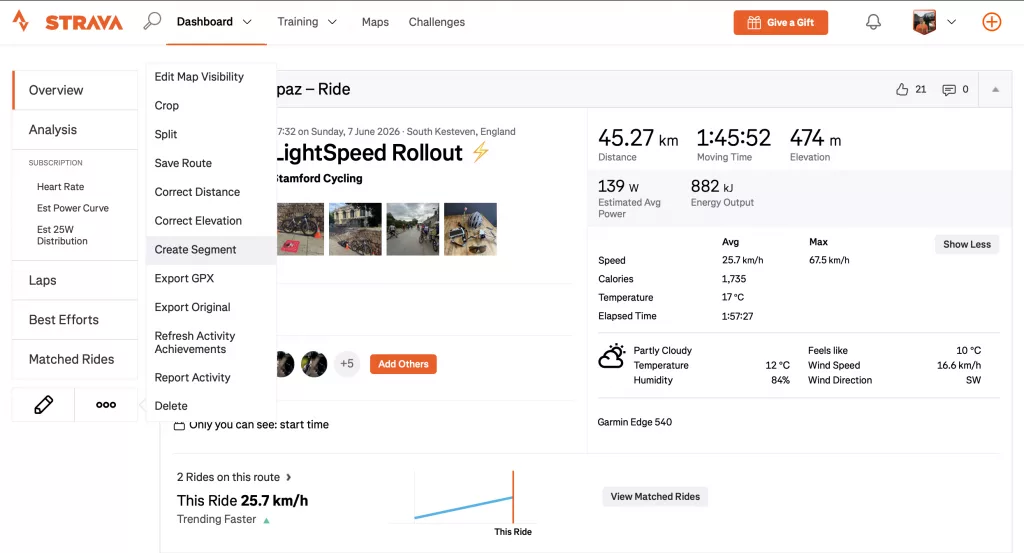
On the activity page, click the three dots (…) menu on the left hand side and select Create Segment (highlighted below). Click that – a map then opens with two sliders.
Step 4: Set the start and finish.
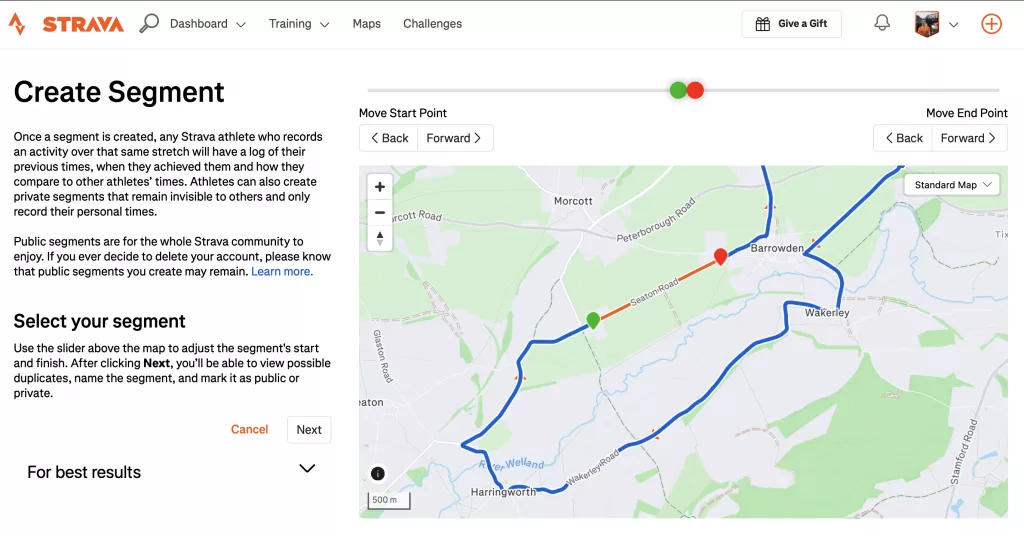
Drag the green slider to where the segment should start and the red slider to where it should finish. Zoom right into the map to place both points accurately. This is the fiddly, fun part.
Tips: zoom right in and set the start and finish on a clear landmark, such as a village sign, a bridge or the crest of a climb. Avoid junctions, roundabouts and traffic lights. Nobody’s time should depend on whether a light was green.
Step 5: Click “Next”, and let Strava check for duplicates.
Strava checks whether a segment already covers the same stretch. If one exists, it’s usually better to star and ride that one than to add a near-copy. You can still create a private duplicate for yourself.
Step 6: Name it and choose public or private
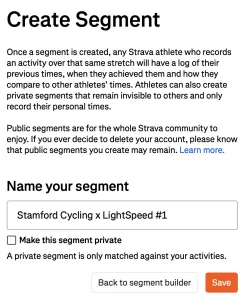
Use a name people will recognise on the road: “Wittering Drift Climb” works much better than “Segment 3”. Strava recommends including landmarks in the name.
- Private: only you see it. Useful for tracking your own progress on a training loop.
- Public: anyone who rides it appears on the leaderboard.
Step 7: Click “Create my Segment”
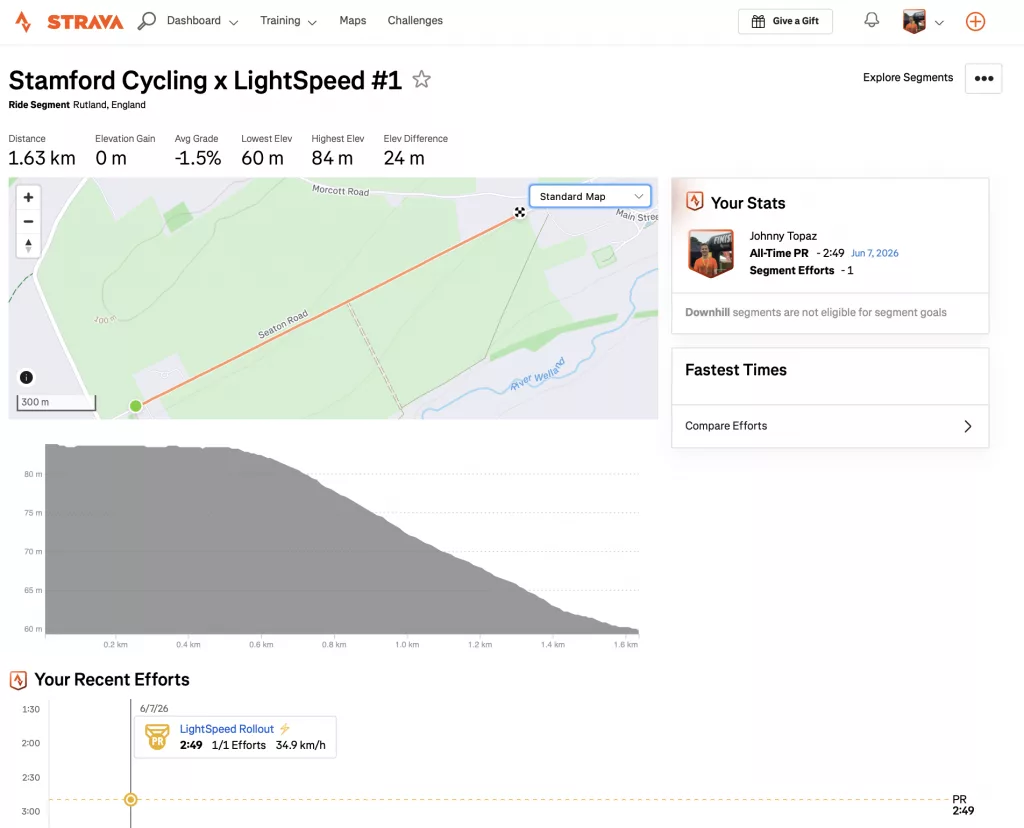
That’s it. Strava then matches past efforts from other riders, which can take several hours, so don’t worry if the leaderboard is empty straight away. The new segment then appears under My segments in the menu.
How to get on the segement leaderboard
This is the easy bit and it’s free for everyone. Once your segment has been published and you’ve ridden the route:
- Upload your ride to Strava as normal.
- Strava automatically matches your effort to any segments along the way.
- Open the ride, scroll to the segments section and there’s your time – sitting on the club leaderboard.
No extra effort, no subscription needed to appear on it. Just ride it, upload it, done. Then we can all squabble gently over who took the KOM at Fika afterwards.
Why can’t I create a segment on Strava?
These are the most common reasons “Create Segment” is missing or doesn’t work:
- You’re using the app. Switch to the website.
- It isn’t your activity. You can only create segments from your own rides.
- It duplicates an existing segment. Strava may block a public copy of an existing segment. Search for that one and star it instead.
- The GPS data is poor. Jumps or gaps in the recording can stop the segment from matching properly.
- The activity is very old or imported. Try a fresh recording of the same stretch.
What makes a good Strava segment?
- Long enough to mean something. Very short segments reward GPS luck more than effort. We aim for at least 200 metres and most good climbs and sprints are much longer.
- Clean start and finish points, away from junctions and hazards.
- One clear effort: a single climb, a flat drag or a sprint. Not a mix of all three.
- Safe to ride hard. If going flat out means taking a blind bend or a busy junction at speed, don’t create it. Strava can edit or remove segments and riders can flag hazardous ones.
How to ride segments sensibly
Segments are great fun, but road safety matters more than any KOM. Ride to the conditions, follow the Highway Code and never race a segment on a group ride unless everyone has agreed and the road is clear. On Stamford Cycling rides we’re a no-drop group, so people save segment efforts for their own time.
Stamford Cycling segments
If you ride with us and create a segment on one of our regular loops, please use the naming format “Stamford Cycling x [name of the stretch]” so club members can find them easily. You’ll find our routes on the Routes page, and you can compare times with other members through our Strava club.